One sidebar for every source
Your repository, each on-chain contract and reference code side by side. A proxy opens straight onto its implementation. One project per window.
 onlink
For smart-contract auditors
onlink puts the repository under review next to every deployed contract it calls. Paste an address, and it fetches the verified source, follows the proxy to the code that actually runs, and keeps it all cached for offline work.
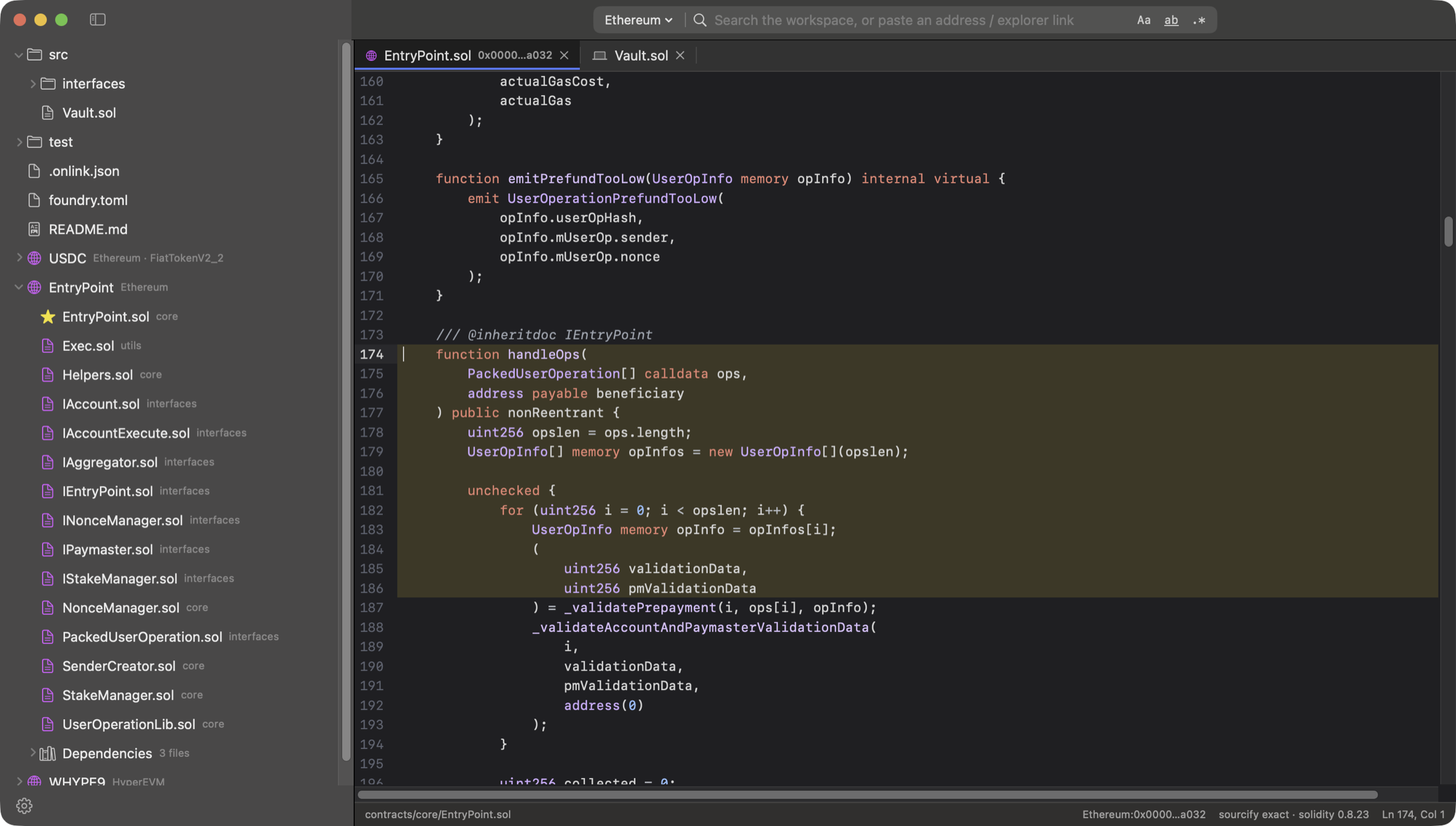
Your repository, each on-chain contract and reference code side by side. A proxy opens straight onto its implementation. One project per window.
Sourcify, Etherscan, Blockscout and Routescan, tried in order per chain and ranked by match quality. Paste an address or an explorer link.
EIP-1967, UUPS, beacons, EIP-1167 clones, Safe, EIP-7702, diamonds and selector routers, read from the chain itself, with upgrade history and alerts when an implementation changes.
Everything is cached in ~/.onlink, keyed by codehash. Open an audit with the network off.
Search the whole workspace, quick-open any file, and ⌘-click from an interface to the deployed contract it's bound to.
The same core as a CLI: every command takes --json, exit codes are stable, and onlink open jumps the app to a line.
Built in, and any other EVM chain by its chainId.
The app with the CLI inside. Unzip and move onlink.app to Applications.
Not notarized yet: the first time, open it from System Settings → Privacy & Security → Open Anyway. The terminal install below doesn't need that.
Installs the app and puts onlink on your PATH (via ~/.local/bin):
curl -fsSL https://github.com/lxhyl/onlink/releases/latest/download/onlink-macos-arm64.zip -o /tmp/onlink.zip
ditto -x -k /tmp/onlink.zip /Applications
mkdir -p ~/.local/bin && ln -sf /Applications/onlink.app/Contents/MacOS/onlink ~/.local/bin/onlink
onlink --versionPaste this into Claude Code, Codex or any coding agent. It installs the CLI and tells the agent how to use it.
Install and use onlink, a CLI for reading verified on-chain contract source (macOS, Apple Silicon).

Install:
  mkdir -p ~/.local/bin
  curl -fsSL https://github.com/lxhyl/onlink/releases/latest/download/onlink-cli-macos-arm64.tar.gz | tar -xz -C ~/.local/bin
  ~/.local/bin/onlink --version

Use onlink instead of block-explorer web pages whenever you need a contract's source:
  onlink --json fetch <chain>:<address> --impl            verified source, plus the implementation behind a proxy
  onlink path <chain>:<address>                            cached source directory: search it with rg / grep / cat
  onlink source <chain>:<address>:<File.sol>#L10-L40 -n    print lines of one file
  onlink --json resolve <chain>:<address>                  proxy kind, implementation / beacon / facets, upgrade history
  onlink --json resolve <chain>:<address> --block <N>      the same at a past block (archive RPC)
  onlink chains                                            chain names and ids

Targets are <chain>:<address>. The chain is a name, alias or chainId (ethereum, eth, base, arbitrum, hyperevm, 999, ...).
Block-explorer and Sourcify links work as targets too.
Every command takes --json: one JSON document on stdout, progress on stderr.
Exit codes: 0 ok, 2 usage, 3 network, 4 rate limited (retry later), 5 invalid API key, 6 provider error,
7 no contract code / not in cache, 8 not verified on any provider.
Sources are cached in ~/.onlink and reused; --refresh fetches again, --offline uses the cache only.
Optional, for wider coverage: add an Etherscan API key with  printf '%s\n' "$ETHERSCAN_API_KEY" | onlink keys add